> For the complete documentation index, see [llms.txt](https://docs.paretodeals.com/llms.txt). Markdown versions of documentation pages are available by appending `.md` to page URLs; this page is available as [Markdown](https://docs.paretodeals.com/display-settings/buy-x-get-y-settings.md).
# Buy X Get Y settings
### 1. Product page
* Choose position to show widget layout in product page by [embedding app](/app-configuration/enable-embed-app.md) and [adding the app block ](https://docs.paretodeals.com/display-settings/pages/nKS64VTcMnYbZJaIbtMg#id-2.-add-app-block-on-product-page)
* Customize color, text, font,... and see preview before publish theme
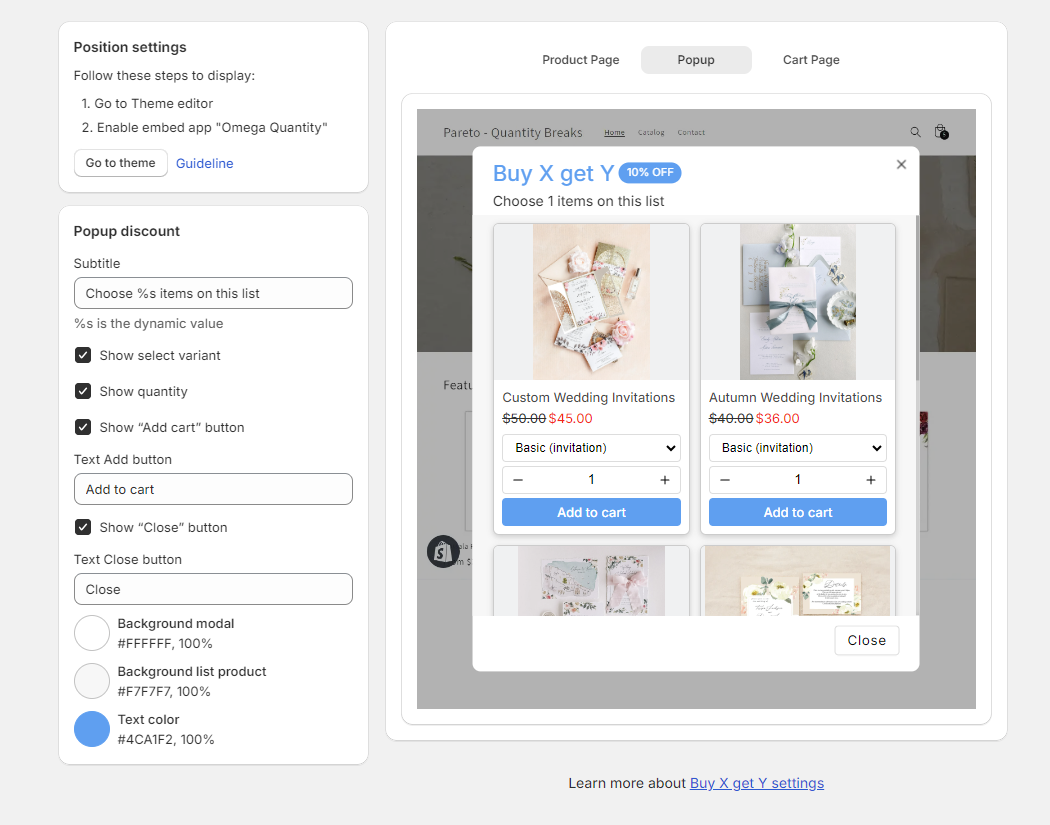
### 2. Popup discount
* Show discounted products when buyer clicks see more on product page layout or cart page when buy X is qualified.
* Customize color, text, show select variant, show quantity,...and buyer can add product to cart
### 3. Cart page
* You can customize notification such as: Buy more get discount, get a gift, or change gift.